Checking documents
Your app can check the documents people send you, such as an insurance certificate or a driver's licence. Only the ones it can't settle come to you, and only the result is kept: the document itself is deleted within 14 days.
What it checks
When a document arrives, your app reads it by itself, in about 10 seconds, and checks what you've asked for. Most businesses ask for these:
- it's the right kind of document, such as an insurance certificate;
- the name on it, of a person or a company, is the one you have for them;
- it hasn't expired.
You can also ask for anything else on it to be checked:
- against their record, such as the address on a licence matching the one you have;
- against a fixed answer, such as the licence class being C;
- against a date, such as being issued after January 1, 2025.
If everything is right, it's Verified, and you don't need to do anything. If not, it comes to you, with the reason.
What it doesn't do. It doesn't look for forgeries, and it doesn't check with an insurer or any official record. It checks only what you've asked for, and leaves the rest to you.
Not yet
It can't yet check that something is one of several answers (such as a zip code from a list), that an amount is at least a certain figure (such as cover of at least $1,000,000), or that someone is at least a certain age. If you ask for one of these, Gregory tells you so.
Setting it up
Tell Gregory what you need, in your own words. For example: "Each groomer uploads their liability insurance certificate. It must be in their name and not expired." Or: "Each driver uploads their licence. It must be class C, with the address we have for them." He sets it up as a change to your app. See Changing your app.
How documents arrive
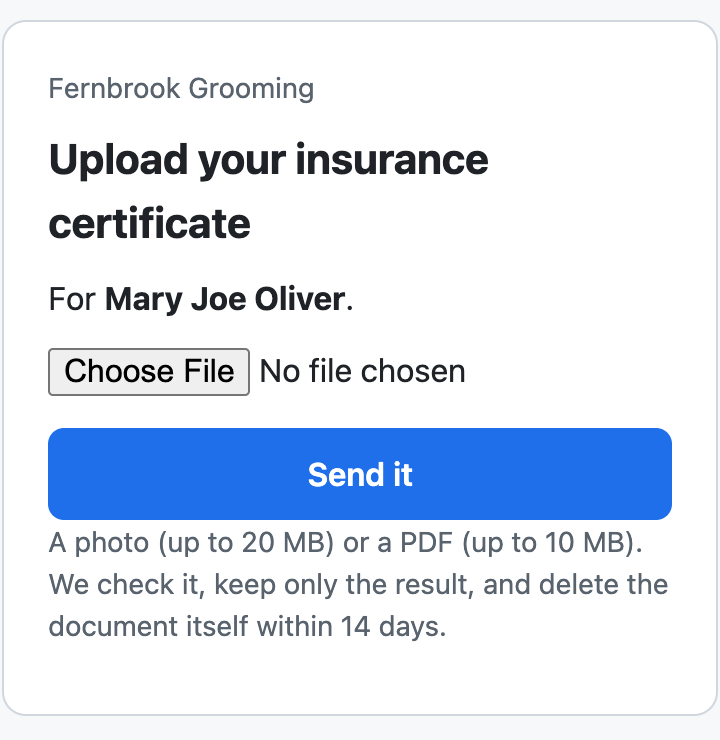
A document can be a photo (up to 20 MB) or a PDF (up to 10 MB). It arrives in one of two ways:
- At your business: you or your staff upload it on the person's record.
- From the person: they fill in a form you send them, on their own phone or computer.
There's no public link for documents, and they can't be emailed in.
The statuses
Each person's record shows where their document is, in the same words in every app:
- Not checked: no document has arrived yet.
- Checking…: it's being read now. The check starts when the record is saved.
- Verified: it passed, or you accepted it.
- Needs review: the check couldn't settle it, so it's waiting for you.
- Not reviewed in time: nobody reviewed it within 14 days, so the document was shredded. You can still ask for a new one.
- Expired: its date has passed.

When one needs review
A document that needs review shows up in three places: in Needs you, on the Checked documents page (its number in the menu is how many need review), and as the status on the person's record. Each one shows what the document says next to what it should say, and why it needs review. For example:
- the name on it isn't the one you have for them;
- it has expired;
- it doesn't look like an insurance certificate;
- it's hard to read, so what it says can't be trusted.

You decide:
- Accept it: it becomes Verified, accepted by you. For example, if it's the same person under their company's name.
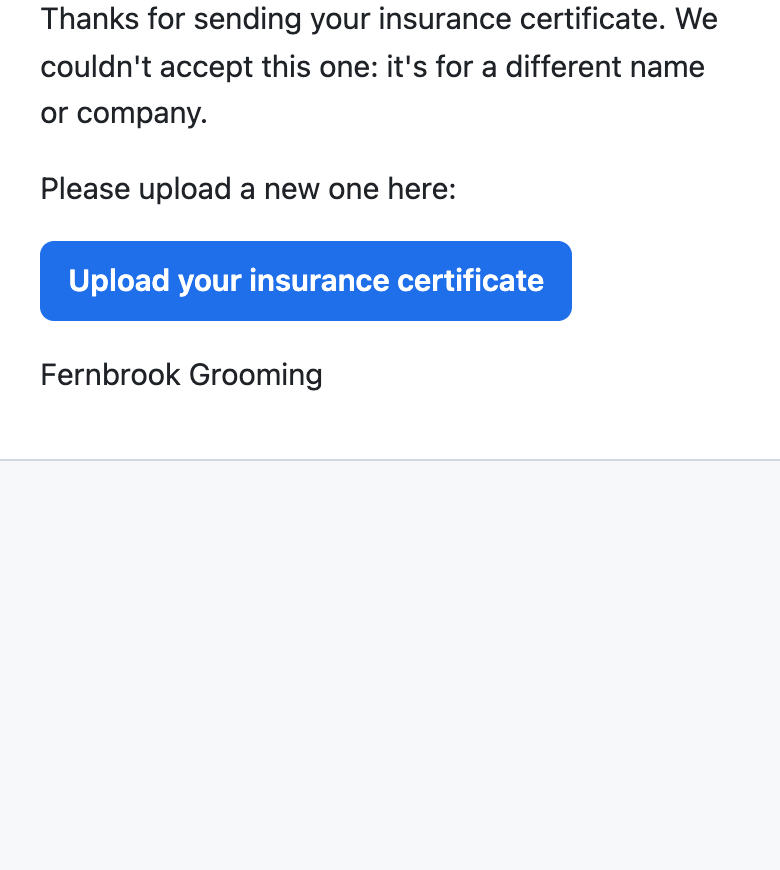
- Ask for a new one: the person gets an email with a button to upload a new one. It works once, and the new document is checked when it arrives.
- Upload a new one: if they hand you a new copy, you or your staff upload it yourselves. It's checked like any other, and the old one shows Replaced.
A document that's hard to read is never trusted. What it seems to say is shown as a guess, and no date on it is acted on.

When a document expires
If a document has an expiry date, the person gets an email 30 days before it expires and another on the day, each with a button to send the new one. On the day, its status turns Expired. Expired only shows: it doesn't stop you booking or serving anyone.
What's kept, and for how long
We keep only the result of the check. The document itself is deleted within 14 days, and it's never in our backups. To read it, it's sent to Anthropic, whose AI does the reading. Anthropic doesn't use it to train AI, and deletes it within 30 days.
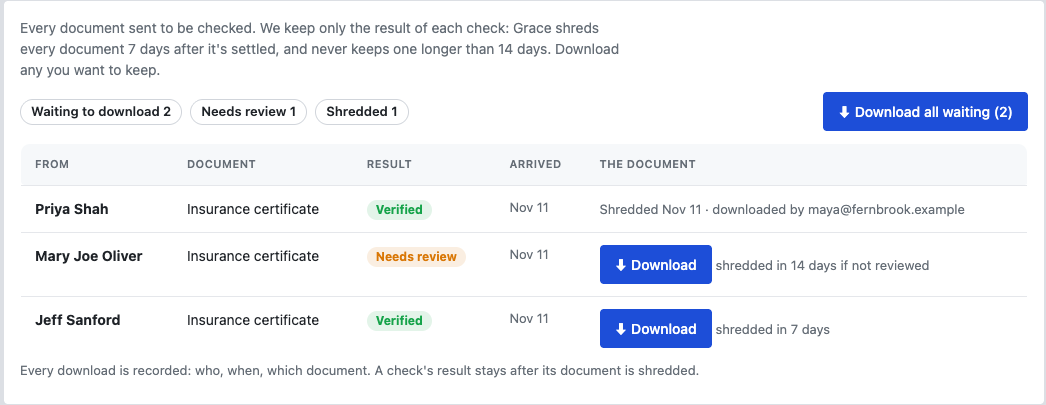
- Grace shreds each document. Once its check is settled (verified, accepted by you, or replaced), you have 7 days to download it. A document still waiting for your review is shredded 14 days after it arrived, whatever happens, and its status becomes Not reviewed in time. This can't be switched off or paused.
- Until then, you can download it to keep your own copy, from its check or from the Checked documents page, which also has Download all waiting. Every download is recorded: who, and when.
- Afterwards the record still shows the result, and when the document was shredded, for example "Shredded Nov 11 · downloaded by …".
The emails
Your app sends three emails about documents. You can reword any of them in Settings → Emails.
- Please send your insurance certificate again: "Thanks for sending your insurance certificate. We couldn't accept this one: (the reason). Please upload a new one here:" and a button to upload it
- Your insurance certificate expires on (the date): "The insurance certificate we have for you expires on (the date). Please send us the new one before then:" and a button to upload it
- Your insurance certificate has expired: "The insurance certificate we have for you expired on (the date). Please send us the new one:" and a button to upload it
Your app puts in the name of the document, so a business that checks licences says "licence". The button reads "Upload your insurance certificate", or "Upload your new insurance certificate" in the expiry emails.
Who can see them
You see every check and every document. Staff see them only if you give them See document checks. Without it, they see the status and the expiry date, but can't open the check or the document.
What it costs
Reading a document costs about 1–2¢ (a photo about 1¢, a PDF about 2¢), and it comes out of your AI allowance. There's nothing else to pay.
If you're stuck
Ask Gregory. He answers questions about your app and tells you where to do things, and questions are free. You can also email support@ask-gregory.com.