Iris, your researcher
Iris is the one helper who reads things outside your app. She hands what she finds to another helper, who decides what to do with it.
What she does
Iris is an AI, labelled as one, and she's in every app. She reads what she's asked to, picks out what matters, and hands it over. She can read:
- web pages
- web searches
- services you've connected, reading only
She also does the outside reading for two of your other helpers: today's calendar for Grace's run-down, and stock photos for Carlos.
What she never does
- Send emails, messages or anything else.
- Change anything outside your app.
- Read or change your records.
- See protected details, like a child's name or an ID number.
She doesn't decide anything either. "3 prices changed" is reading. "So lower ours" is a decision, and it belongs to the helper who gets it.
Why only Iris reads outside
Pages on the internet can hide instructions meant for an AI. So your other helpers never read outside your app, and no setting changes that.
Iris can only read and hand over. The helper who gets it is told to treat it as information, not instructions, and still follows its own limits and asks you first where it should.
Having her keep an eye on something
Tell Gregory what to watch, how often, and what should happen with it. For example: "Every Monday, read my supplier's price list and update my prices."
Every Monday Iris reads your supplier's price list, and your own helper updates your prices. What she watches always goes to a helper of your own, because Judy, Grace and Carlos have set jobs. If you don't have the right helper yet, Gregory will make one with the watch. It's checked like any other change.
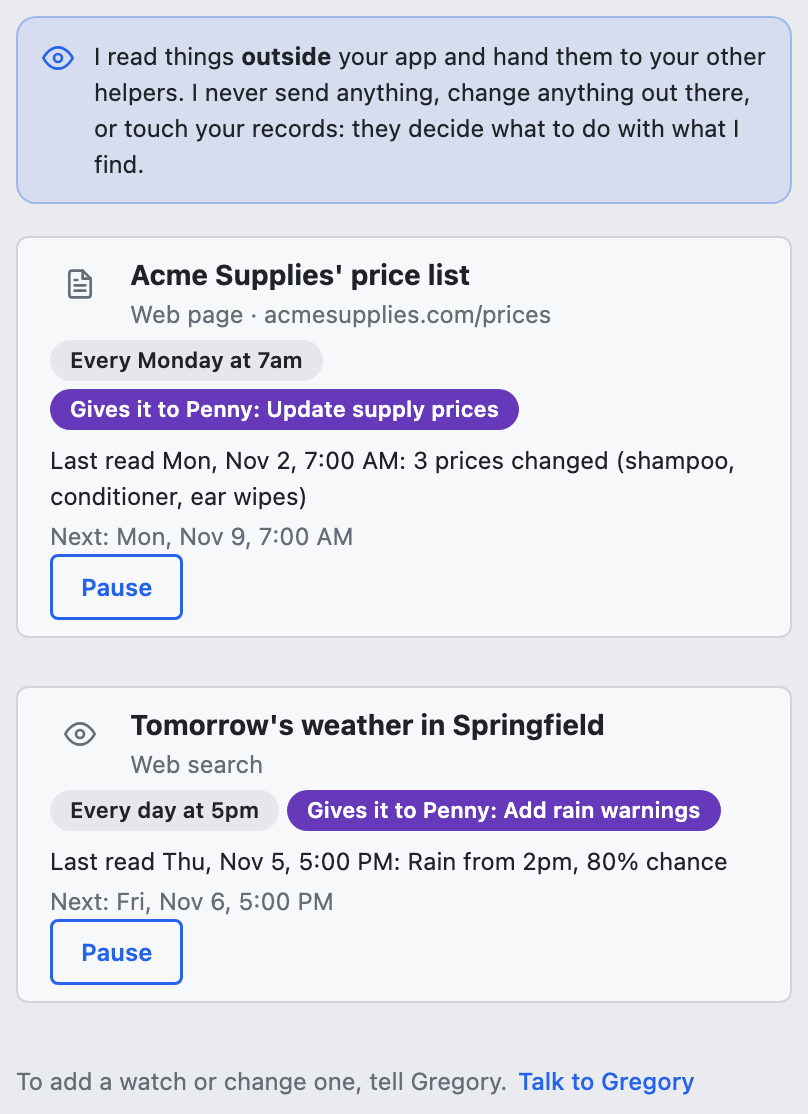
Open Iris to see What I watch: where each thing is read, how often, who gets it, and what she last found. Choose Pause on a watch to stop that one. To add or change one, tell Gregory.
When a helper needs something now
A helper of your own can also ask Iris on the spot, while it's working. For example: "When a new booking comes in, look up the address to make sure it's real." Tell Gregory, and he'll set it up.
Seeing what she read
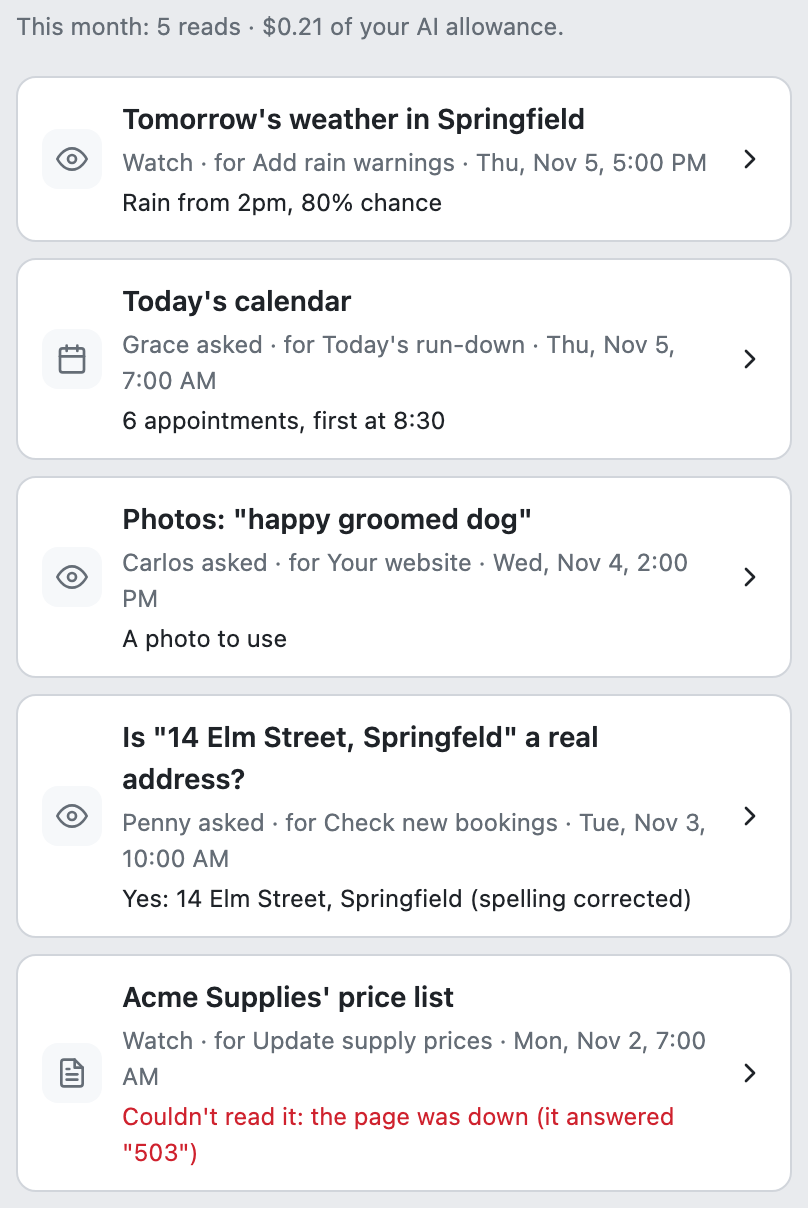
Open What I read to see every read, newest first: where it came from, who it was for, and what she found. If she couldn't read something, it says so and why. Choose a read to see exactly what she handed over and what it cost.
Pausing Iris
Pause Iris and she reads nothing at all until you start her again. Your other helpers carry on without what she'd have read:
- A helper of your own is told she's paused, and carries on or hands it to you.
- Carlos uses illustrations instead of stock photos.
- Grace's run-down doesn't go out that day, because it's built from your calendar. You'll see a line saying so in Activity and on the run-down's card.
Does she ask first?
Iris has nothing to ask about, because she never sends or changes anything. The helper who gets what she read asks you first while it's new, and you decide when it can stop.
Your AI allowance
Her reading counts in your AI allowance, and she has her own daily limit. Today's calendar for Grace and photos for Carlos use no AI.
If you're stuck
Ask Gregory. He answers questions about your app and tells you where to do things, and questions are free. You can also email support@ask-gregory.com.