Judy on your website
An Ask us button on your website. Judy answers visitors from what she knows, and brings you what she doesn't.
Switching it on
The chat works on the website Carlos makes, and it's offered once that website is live. Have a website made elsewhere? Email support@ask-gregory.com, and we'll tell you whether the chat can go on it.
- Open Judy, and choose Add jobs.
- Choose Answer questions on your website.
- Read what she does and the limits, then choose Switch it on.
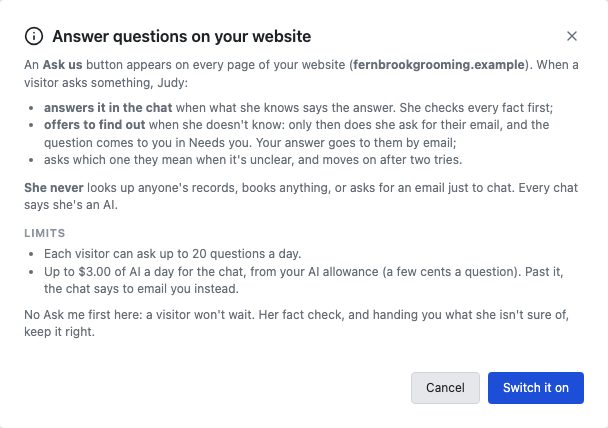
This job doesn't ask you first. A visitor won't wait, so her answers go straight to them. She checks every fact first, and brings you what she isn't sure of.
Getting her ready
Judy answers only from what she knows, so look there first: open Judy, and choose What I know. If she hasn't been told something, she'll say she doesn't know and offer to find out.
What visitors see
An Ask us button on every page. She says she's an AI, and asks visitors not to share private details.
- If she knows, she answers in the chat.
- If it's unclear, she asks which one they mean, and moves on after two tries.
- If she doesn't know, she offers to find out. Only then does she ask for their email.
- If they ask about their own booking or account, or anything else she can't answer in public, it comes to you the same way. She never books anything: she says how to book, if she knows how.
Answering what comes to you
When a visitor leaves their email, the question arrives in Needs you. Write your answer and choose Send my answer. It goes to them by email.
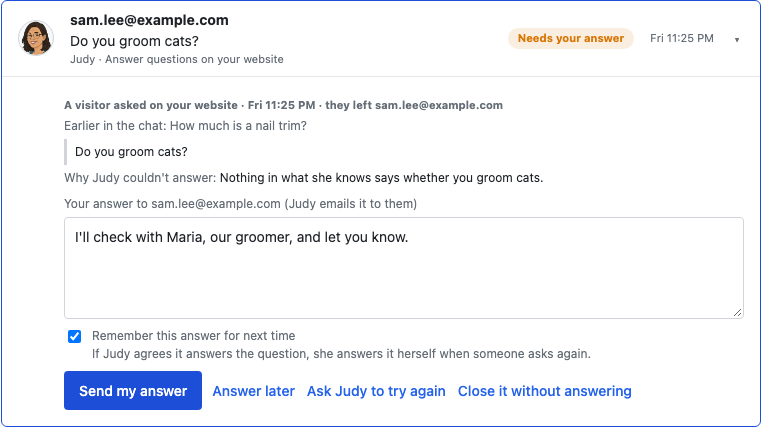
Your other choices:
- Answer later: it keeps waiting, with what you wrote.
- Ask Judy to try again: useful once you've taught her the answer.
- Close it without answering: for junk, or an address that can't receive email.
Judy checks your answer before it goes, as she does for email she hands you. If you ask her to remember it and she agrees it answers the question, she answers it herself next time.
If the email can't be delivered, you're told. If a visitor's address doesn't exist, the question closes.
Reading your chats
Once it's on, Judy's page has a Website chat topic. It shows this week's counts and cost, then each chat. Open one to read all of it.
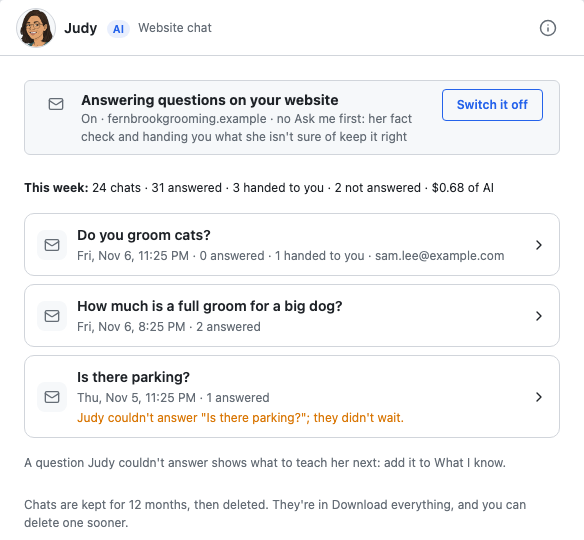
A line such as Judy couldn't answer "Is there parking?"; they didn't wait means the visitor moved on, so there's nothing you have to do. It does show what to teach her next.
Chats are kept for 12 months, then deleted. They're in Download everything, and you can delete one sooner by opening it.
Pausing and switching off
- Switch it off: in Judy's Website chat, choose Switch it off. The button comes off your website straight away. Your chats, and any questions waiting for you, stay. You can switch it back on in Add jobs.
- Pause Judy: the chat tells visitors to email you instead, and her other jobs stop too.
What it costs
Answering uses your AI allowance, a few cents a question. Each visitor can ask up to 20 questions a day, and up to 60 a day can come from one internet address, such as a shared office or café connection. The chat uses up to $3 of AI a day. Past any of these limits, the chat tells visitors to email you. If your allowance runs out, she offers to pass on their question, and it comes to you if they leave their email.
If you're stuck
Ask Gregory. He answers questions about your app and tells you where to do things, and questions are free. You can also email support@ask-gregory.com.