From first chat to your app
How your app goes from a conversation with Gregory to working for your business, and what you decide along the way.
The path, in short
Talk to Gregory
Gregory is an AI. He suggests what's typical for a business like yours, and you say what's different.
See a sketch, if you like
A Quick look gives you a first version to try, with made-up people.
Built and checked
Your app is built and tested, and a person checks it. We call that Hallmark.
It's yours
You read what was decided for you, try it, and say go. Nothing goes live before that.
Your app is a web app. Everyone who uses it opens it in the browser on any phone, tablet or computer. No app store, nothing to install.
What this costs: talking to Gregory and the Quick look are free. Your plan starts when you ask him to build: $300 a month, and for a limited time your first 2 months are $100 each. See Your plan and AI allowance.
Signing in for the first time
When your place opens, we email you a one-time code.
- Go to your app's address.
- Choose First time here? I have a code.
- Enter your email, the code from your email, and a new password.
- Choose Set password and sign in.
After that, you sign in with your email and password. If you forget your password, you can reset it from the sign-in page.
Choosing how to start
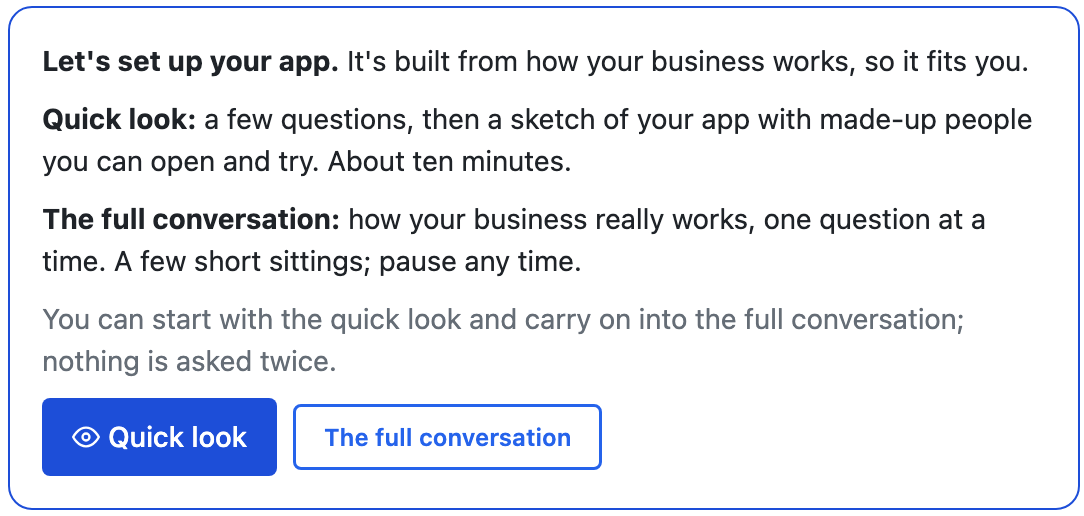
Open Gregory, then Changes. He asks how you'd like to begin. Pick whichever suits you today.
- Quick look: a few questions, then a sketch of your app with made-up people that you can open and try. It takes about ten minutes.
- The full conversation: how your business really works, one question at a time, so your app fits it. It takes a few short sittings.
You can start with the Quick look and carry on into the full conversation. Nothing is asked twice.
Talking to Gregory
You don't need to know anything about software. You know your business, and that's what Gregory needs.
- React to what he suggests. He'll propose what's typical for a business like yours. Keep it, change it, or skip it.
- Use your own words. Call things what you call them. Your app will too.
- Talk instead of typing, if you like. On a phone, tap the microphone on your keyboard.
- Check what he's understood. Your picture shows it as you go. Nothing is final until you confirm it.
Stopping and carrying on
There are two ways to stop, and both are always there while you talk:
- Pause, come back later: everything you've said is saved. Close it any time and pick up from any device, right where you left off.
- That's all for now: you've said enough. Gregory puts together what he knows and what he'll assume for the rest, so you can ask for your app.
Your sketch
After a Quick look, Gregory can make a sketch: a first version of your app to click through. Bigger apps take longer, and you can come back later. It'll be waiting for you.
Choose See your sketch to open it. A banner stays at the top to remind you what it is:
Sketch: made-up people, not reviewed by a person. Nothing here is real or sent.
From that banner you can:
- Viewing as: see the app as someone else would, such as a member of staff.
- Emails: read the emails that would have gone. None are really sent.
- Tell Gregory: write notes as you look around.
- Back: return to Gregory.
Then choose what's next:
- Build my app from this: the real app, made from what you've told him.
- Change something: say what's different, and he makes the sketch again. There's a daily limit on remaking it, and he shows how many are left.
- Carry on with the full conversation: more questions, so the app fits your business more closely.
Asking for your app
When you've said enough, Gregory shows Ready to build your app? with everything your first build will be made from. Anything he's guessed is marked.
- Build it like this takes you to the next step, starting your plan.
- Change something takes you back to tell him what's different.
You can change any of it later too, by asking him in a sentence.
Your staff, to start with: they can see and change everything except money, and only you can delete. To change what a kind of staff can do, tell Gregory. To add or remove a person, use Users in your app.
Starting your plan
Gregory shows you Start your plan, with your price and what it includes.
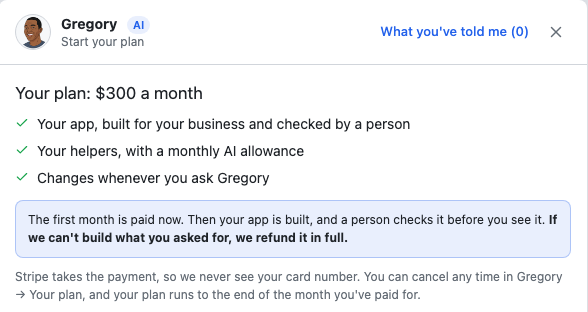
- Choose Add your card and start. You pay on Stripe's own page, so we never see your card number.
- Your first month is paid, and your app starts being built.
Our promise: if we can't build what you asked for, we refund the first month in full.
Not ready? Choose Not now. You can start any time from Gregory → Your plan.
While it's built and checked
Your app is built in a safe copy with made-up records, so nothing real is touched. It's tested, and then a person on our team checks it by hand. You can follow where it stands under Changes, below Gregory, and we email you the date we expect it to be ready.
You don't need to do anything, though there's one thing worth starting now: card payments, from your Home page. Stripe takes a few days to check a business.
If your app needs something we have to build first, we tell you what it is and when we expect it. If that date changes, we tell you before it passes.
"Your app is ready"
When the check is done, Your app is ready shows under Changes, and in Needs you. Choose Have a look, and please read it before you say go.
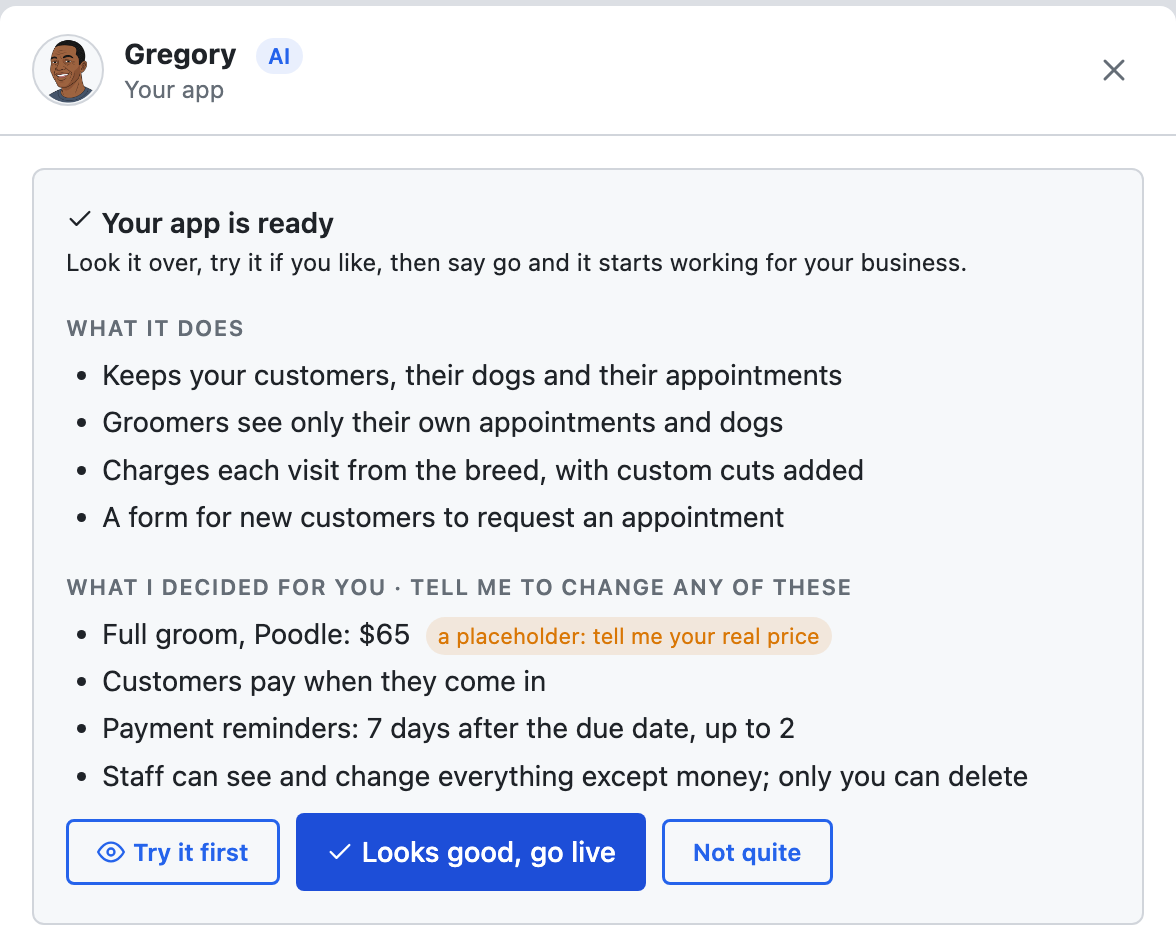
- What it does: what your app does, in plain words.
- Not yet: if a piece is still on its way, you see when we expect it. You can use your app now or wait for it.
- What I decided for you: every choice you didn't make yourself, such as prices, who gets billed, reminders, and who can see what.
Look out for prices. If you never gave Gregory a price, the one in your app is a placeholder, and it's marked. Tell him the real one.
Saying go
You have three choices:
- Try it first: open your app with sample data. Your real records aren't shown, and no email is really sent.
- Not quite: say what isn't right. It's changed to match and comes back to you here.
- Looks good, go live: your app starts working for your business.
Once it's live, you can see what Gregory knows about your business any time under Your business, below Gregory.
If you're stuck
Ask Gregory. He answers questions about your app and tells you where to do things, and questions are free. You can also email support@ask-gregory.com.