Grace, your office manager
Grace keeps your Google Calendar and Google Sheets up to date, and sends the morning run-down.
Sharing your calendar or sheet
Grace is an AI helper, but her ready-made jobs use no AI, so they never touch your AI allowance. Your app can only see the calendar or sheet you share, and nothing else in your Google account.
- On your Integrations page, choose Connect Google. Your app gets its own Google address.
- In Google, share one calendar or one sheet with that address, the way you'd share with a colleague. Choose Make changes to events for a calendar, or Editor for a sheet.
- Paste its link into your app.
- Open Grace, choose Add jobs, and pick a job.
To stop, un-share it in Google. Some Google Workspace businesses block sharing outside their company until their admin allows this address.
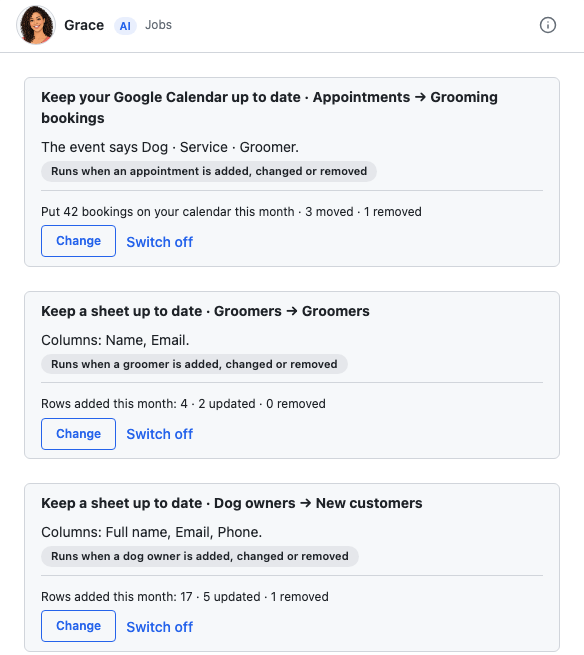
Keep your Google Calendar up to date
Each booking goes on your shared calendar, moves when its date changes, and comes off when it's cancelled or removed. You choose what the event says. Phone numbers and email addresses never go on the calendar, and no Google invitations go to guests.
Today's run-down
Each morning at your chosen time, the day's bookings go by email, to you or to each member of staff you choose, each with their own day. If there are no bookings that day, no email goes. Iris reads today's calendar for it, and that read uses no AI. While Iris is paused, the run-down doesn't go out, and a line in Activity and on the run-down's card tells you.
Keep a sheet up to date
Each new record becomes a row in your shared sheet, with the columns you choose. It's kept current as records change.
Does she ask first?
Her calendar and sheet jobs don't ask first. They simply keep things up to date, and you can switch off any job. Her run-down email goes by itself once you've approved the wording. If you'd like to see it before it goes, switch on Ask me first in Settings → Emails.
Not yet
It's one way only. Changes you make in Google aren't copied back into your app.
If you're stuck
Ask Gregory. He answers questions about your app and tells you where to do things, and questions are free. You can also email support@ask-gregory.com.