How your helpers work
What helpers are, and how you stay in charge of them.
What a helper is
A helper is an AI with a name and a role, and it's always labelled as an AI. You'll see them listed below Gregory, who looks after them:
- Judy, front desk: your customers' email and forms, and questions on your website.
- Grace, office manager: your Google Calendar and Google Sheets.
- Carlos, web designer: your business's website, when you ask him to start.
- Iris, researcher: reads things outside your app and hands them to another helper.
- A helper of your own: for a chore none of them covers.
Inside and outside
Your helpers work inside your app. They can send things out, like Judy's emails or Grace's calendar updates, but they never read anything outside your app.
Only Iris reads outside. Pages on the internet can hide instructions meant for an AI, so this is built in, and no setting changes it. Iris can only read and hand over. The helper who gets it is told to treat it as information, not instructions, and still follows its own limits and asks you first where it should.
Switching on a job
Each helper does their work as separate jobs, and you choose which ones run. Open a helper, then:
- Add jobs: what they can do for you. Pick one to switch it on.
- Jobs: what's running, and what each job has done this month. Switch off is here too.
Want a helper to do something that isn't listed? Ask Gregory.
Needs you
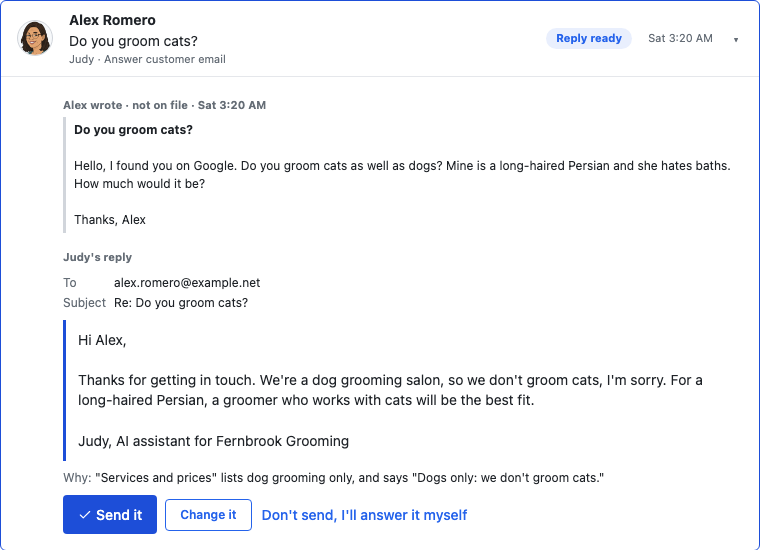
Anything waiting for your say-so is in Needs you: a reply to check, a question a helper couldn't answer, or a website draft. Each one says why, and has its own buttons.
Activity
Everything your helpers do shows in Activity, including what's already been sent.
Asking first, and sending alone
A new helper's emails wait in Needs you until you send them. When you trust a job, choose Send without asking on it. First, you're told plainly what you'd stop checking, and you can choose Keep asking me.
This is set job by job. You can switch Ask me first back on any time. If you can, keep checking until you rarely change what a helper writes, because a correct answer can still strike the wrong tone.
How this works is different for each helper, so each helper's page says what's true for them.
Pausing
- A whole helper: open them, then choose the Pause button, such as Pause Judy.
- One job: tell Gregory, for example "pause Judy's reminders", and confirm with a tap.
Everything you've paused is listed in Paused, with Start it again. After a week, Needs you reminds you about each one.
What uses your AI allowance
Your plan includes a $75 monthly AI allowance. Only AI work uses it.
- Uses it: Judy answering email and questions on your website, Carlos making and changing your website, Iris's reading, and any AI a helper of your own uses.
- Doesn't use it: Grace's ready-made jobs, Judy's emails once you've approved the wording, fixing a word or photo on your website, and Iris reading today's calendar for Grace or finding photos for Carlos.
Each helper also has a daily limit, so an unusual day can't run up costs. If the allowance runs out, only the helpers' AI pauses. Your app keeps working, and Judy hands new emails to you. See Your plan and AI allowance.
Not yet
Helpers only read email sent to your app's own address, never your personal inbox. They send email; text messages are coming soon.
If you're stuck
Ask Gregory. He answers questions about your app and tells you where to do things, and questions are free. You can also email support@ask-gregory.com.